
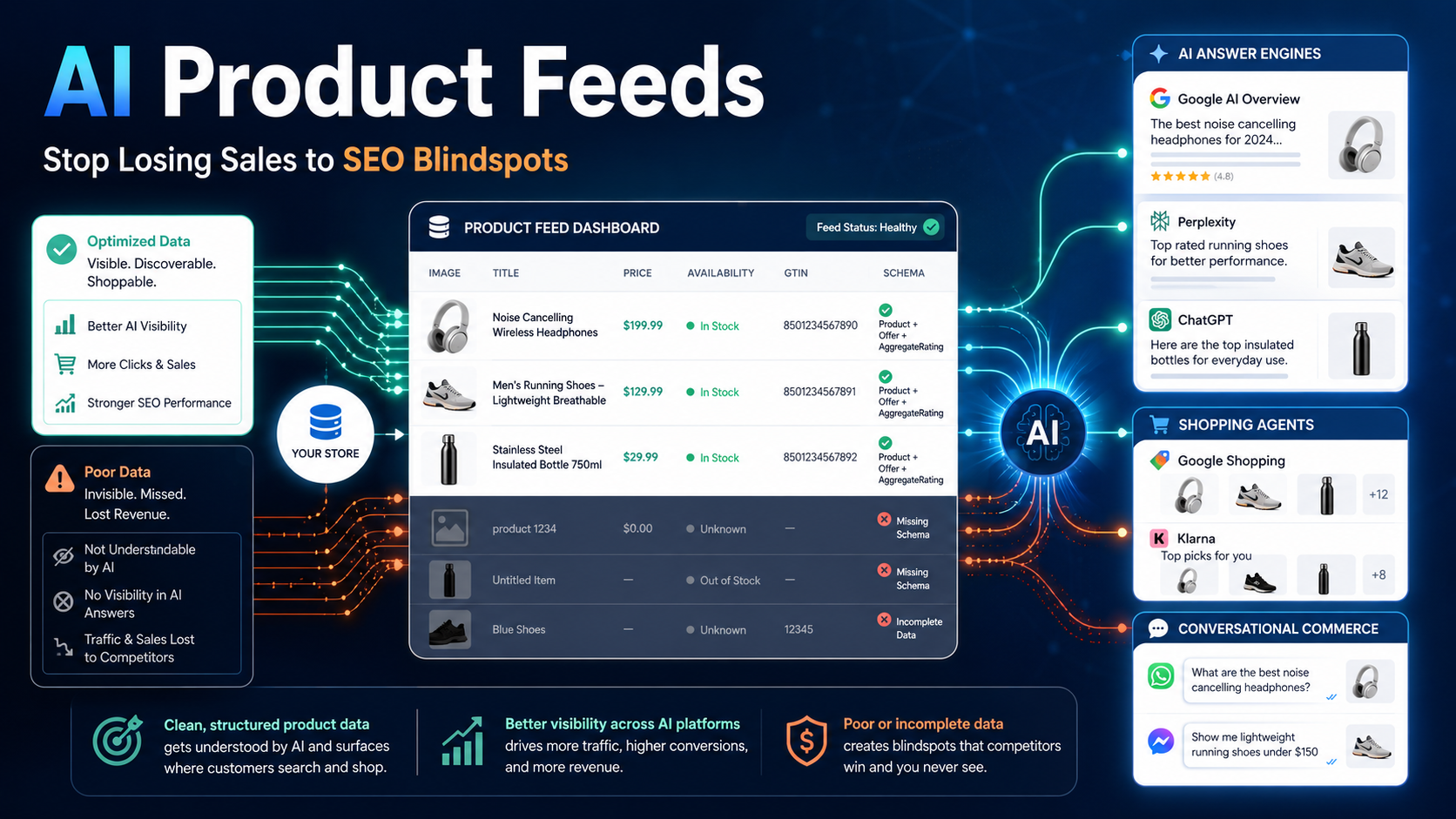
Here’s a scenario I’ve seen play out dozens of times: a Shopify store owner spends weeks perfecting their Google Shopping feed, their product pages rank well, and then — almost overnight — traffic starts dropping. Not because of a penalty. Not because of a competitor undercutting prices. But because AI answer engines and shopping agents are pulling product data from somewhere else entirely, and their feed isn’t structured to show up there.
This is the new SEO blindspot killing e-commerce sales in 2025. Most guides will tell you to update your title tags or add Schema markup. Very few will tell you what’s actually happening at the infrastructure level — and how to fix it before your competitors figure it out.
In this guide, you’ll learn exactly how AI product feeds work, why traditional feed optimization isn’t enough anymore, and the specific steps you can take right now to make your product catalog visible to AI agents, answer engines, and conversational commerce platforms. Whether you’re running a Shopify store in Mumbai, a WooCommerce site in Dubai, or a multi-channel operation anywhere in between, this applies to you.
What Are AI Product Feeds — And Why Do They Differ from Traditional Feeds?
A traditional product feed is a structured file — usually XML, CSV, or JSON — that contains your product data: title, price, description, image URL, availability, and a handful of other attributes. You submit it to Google Merchant Center, Meta Commerce Manager, or a comparison shopping engine, and those platforms use it to display your products in shopping ads or listings.
An AI product feed is built for a fundamentally different kind of consumer. Instead of a human scanning a grid of product images, you now have AI agents — think Google’s AI Overviews, Perplexity Shopping, ChatGPT’s browsing tools, and emerging conversational commerce bots — making product recommendations on behalf of users. These agents don’t browse your store. They pull from structured data sources, crawl feeds, and interpret semantic context to decide which product best answers a user’s query.
The critical difference: traditional feeds optimize for keyword matching. AI-ready product feeds optimize for intent matching and semantic relevance. A shopper asking “what’s the best non-stick pan for a small apartment kitchen under ₹2,000?” isn’t typing keywords — they’re expressing a nuanced need. Your feed either speaks that language or it doesn’t.
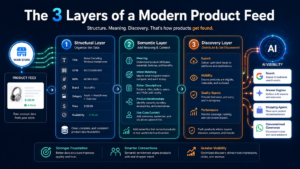
The Three Layers of a Modern Product Feed
- Structural layer: The format and completeness of your feed attributes (title, GTIN, MPN, brand, category, condition, price, availability)
- Semantic layer: The meaning and context embedded in your descriptions, attribute values, and product relationships
- Discovery layer: How and where the feed is submitted, crawled, or made available to AI systems and answer engines
Most SMBs nail the structural layer (or at least attempt to). Almost none have thought seriously about the semantic and discovery layers. That gap is exactly where sales are being lost.
How AI Answer Engines and Shopping Agents Actually Use Your Product Data
To fix the problem, you need to understand the pipeline. When a user asks Google’s AI Overview “which running shoes are best for flat feet under $100,” here’s a simplified version of what happens:
Google’s AI model retrieves candidate products from its indexed data — which includes your Google Merchant Center feed, your structured product markup on-page (Schema.org Product), and signals from your product pages themselves. It then ranks those candidates based on how well they match the intent of the query, not just keyword overlap. Products with richer, more specific attributes get favored.
Perplexity’s shopping module works similarly but also pulls from third-party review sources and live web crawls. ChatGPT’s shopping features (rolled out in 2024) rely heavily on partnerships with data providers like OpenTable, Klarna, and direct merchant feeds via plugins and API integrations. Emerging tools like Google’s Project Astra and Amazon’s Rufus conversational assistant are even more feed-dependent.
The takeaway: AI answer engines and product visibility are directly linked to feed quality. If your feed is sparse, mismatched to real-world language, or missing key attributes, you’re invisible to these systems — even if your website ranks on page one.
Zero-Click Search and What It Means for Product Discovery
Zero-click search optimization has become urgent for e-commerce. When an AI Overview answers a shopping query directly in the SERP, a significant portion of users never scroll further. Studies from SparkToro and Datos suggest that over 60% of Google searches in some categories now end without a click. For product searches, that number is rising fast.
This doesn’t mean you should panic and abandon SEO. It means you need to ensure your product data is the source those AI panels are drawing from. If your feed is well-structured, semantically rich, and properly submitted, your product can appear in the AI panel itself — turning a zero-click search into a direct sale or a high-intent click to your product page.
The 7 Most Common Product Feed SEO Blindspots (And How to Fix Them)
1. Generic Product Titles That Don’t Match Natural Language
The single biggest feed mistake I see is product titles written for internal SKU management, not for how real people search. “Men’s BLK Jacket L/XL SKU-4821” tells an AI agent nothing useful. “Men’s Lightweight Black Puffer Jacket — Windproof, Sizes L and XL” gives it everything it needs to match against conversational queries.
Fix it: Rewrite titles using the format: [Brand] + [Key Feature] + [Product Type] + [Attribute 1] + [Attribute 2]. Front-load the most important descriptor. For AI product feed optimization, think about what a customer would say out loud, not what looks neat in a spreadsheet.
2. Thin or Duplicate Product Descriptions
Many SMBs use manufacturer descriptions or copy-paste the same text across variants. AI systems use description text to understand product context, use cases, materials, and compatibility. A description that says “High-quality ceramic mug” teaches the AI nothing. One that says “300ml ceramic coffee mug with double-wall insulation, dishwasher-safe, ideal for home office use” gives it multiple match vectors.
Fix it: Write unique descriptions for each product or meaningful product group. Include: primary use case, key materials/specs, compatibility or fit notes (for apparel or accessories), and any certifications (BIS, CE, organic, etc.) that buyers in your market care about.
3. Missing or Incorrect GTIN/MPN Data
Google’s machine learning product matching relies heavily on Global Trade Item Numbers (GTINs) and Manufacturer Part Numbers (MPNs) to resolve product identity across the web. If your GTIN is missing or wrong, Google can’t confidently match your listing to a known product — which means it won’t surface your feed in AI-assisted shopping results or comparison panels.
Fix it: Source GTINs from your supplier or brand directly. For private-label products where no GTIN exists, submit identifier_exists: FALSE in your feed rather than leaving it blank or entering a fabricated number. Tools like DataFeedWatch and Feedonomics can audit your GTIN coverage at scale.
4. Not Using All Available Custom Labels
Google Merchant Center allows up to five custom labels per product. Most merchants leave these empty or use only one. Custom labels are powerful signals for both automated bidding and AI-assisted categorization — you can use them to tag products by margin tier, season, bestseller status, or audience intent.
Fix it: At minimum, use custom labels to flag: (1) your top 20% revenue-generating SKUs, (2) seasonal or promotional items, (3) products with strong review scores. This helps both Smart Shopping campaigns and AI systems prioritize the right items for the right queries.
5. Ignoring Structured Data Markup on Product Pages
Your Merchant Center feed and your on-page structured data (Schema.org Product markup) should be in sync. Many stores have one but not the other, or they contradict each other — different prices, different availability status. This inconsistency reduces AI confidence in your data and can trigger “mismatched data” disapprovals in Google Merchant Center.
Fix it: If you’re on Shopify, the platform adds basic Product schema automatically, but it’s often incomplete. Use an app like JSON-LD for SEO or Schema App to add complete markup including offers, aggregateRating, brand, sku, and gtin13. On WooCommerce, the Rank Math plugin handles this well with minimal configuration.
6. Static Feeds That Don’t Reflect Real-Time Inventory
Dynamic product feeds update in real time (or near-real time) to reflect current prices, stock levels, and promotions. Static feeds — uploaded once a week or month — create mismatches that frustrate shoppers and get flagged by AI systems as unreliable data sources. An AI agent that recommends a product shown as “in stock” when it’s actually sold out is going to stop trusting your feed.
Fix it: Move to dynamic feed generation. Shopify’s native Google & YouTube channel app supports near-real-time sync. For more control, tools like GoDataFeed, Channable, or Feedonomics let you set update frequency as high as every hour. For stores with large catalogs (10,000+ SKUs), this is non-negotiable.
7. Not Optimizing for Conversational Commerce Feeds
This is the most forward-looking blindspot. Platforms like WhatsApp Business Catalog, Instagram Shopping, and emerging AI chat commerce tools require a different kind of feed structuring — one that supports conversational queries, multi-turn product comparisons, and attribute-based filtering in natural language.
Fix it: When building product descriptions and attribute values, write them so they can answer follow-up questions. Instead of color: “Red,” use color: “Deep crimson red.” Instead of material: “Polyester,” use material: “Breathable recycled polyester, 95% polyester 5% spandex.” These richer values give conversational AI systems more to work with when a user asks “does it come in darker shades?” or “is it stretchy?”
How to Structure Product Feeds for AI Discovery: A Step-by-Step Process
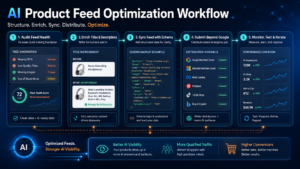
Step 1: Audit Your Current Feed Health
Start with Google Merchant Center’s Diagnostics tab. Look at disapproval rates, warnings, and data quality scores. Then run your feed through a tool like DataFeedWatch or Feedonomics to get a coverage report showing which attributes are missing across your catalog. Prioritize fixing disapprovals first, then missing attributes on your top 100 revenue SKUs.
Step 2: Enrich Product Titles and Descriptions with Semantic Depth
Create a title template for each product category in your store. For example, for a fashion store: [Brand] [Material] [Product Type] for [Use Case] — [Key Feature], [Size Range]. Apply this template programmatically using feed management tools, then manually review the top 50 products to ensure the output reads naturally.
For descriptions, use a three-sentence structure: (1) What it is and its primary use case, (2) Key features and materials, (3) Who it’s ideal for and any compatibility/sizing notes. This structure happens to be exactly what AI retrieval systems look for when matching products to intent-heavy queries.
Step 3: Align Your Feed with On-Page Schema
Pull a sample of 20 products and compare the attributes in your feed against the Schema.org markup on the live product page. Check: price, availability, GTIN, brand, description text, and image URL. If they differ significantly, set up a process (via your CMS or a feed management tool) to sync them from the same data source.
Step 4: Submit to More Than Just Google
Most SMBs submit feeds to Google Merchant Center and stop there. For AI answer engines and product visibility across the full discovery landscape, you should also consider: Microsoft Merchant Center (Bing, which powers many AI assistants), Meta Commerce Manager (Instagram and WhatsApp Shopping), Pinterest Catalogs, and increasingly, Amazon’s product API for sellers on that platform. Each of these feeds into different AI recommendation systems.
Step 5: Monitor, Test, and Iterate
Set a monthly feed review cadence. Track: disapproval rate (target below 1%), impression share in Google Shopping reports, and — for AI Overviews — use Google Search Console’s search appearance filters to see if your products are appearing in AI-assisted results. Tools like SEMrush’s E-commerce SEO toolkit and Ahrefs can help track SERP feature appearances for your target queries.
AI Product Feed Strategy for SMBs: Where to Start When Resources Are Limited
If you’re running a lean operation and can’t overhaul your entire feed overnight, here’s the prioritized order of impact:
- Week 1: Fix all Google Merchant Center disapprovals and add missing GTINs to your top 50 SKUs
- Week 2: Rewrite product titles for your top 20 revenue products using the semantic title template above
- Week 3: Add or improve on-page Schema.org Product markup for the same 20 products
- Week 4: Switch to a dynamic feed update schedule (at least daily) and set up Microsoft Merchant Center
- Month 2: Enrich descriptions for the full catalog and add custom labels for AI-assisted campaign targeting
This sequence gives you the highest-impact wins first without overwhelming your team. Even completing weeks 1 and 2 alone will put you ahead of a significant portion of your competitors.
Tools That Make AI Product Feed Optimization Manageable
You don’t need an enterprise budget to get this right. Here are the platforms worth knowing:
- DataFeedWatch — Excellent for multi-channel feed management and rule-based title/description optimization. Strong Shopify integration. Starts around $59/month.
- Feedonomics — Enterprise-grade feed management used by larger retailers. Offers full-service feed optimization if you don’t want to DIY.
- Channable — Popular in European and Middle Eastern markets, strong automation rules and real-time sync. Great for WooCommerce users.
- GoDataFeed — More affordable option for SMBs, supports 200+ channels and offers solid feed diagnostics.
- Google Merchant Center Next — Google’s revamped merchant hub now includes AI-powered product suggestions and free listing optimization recommendations directly in the interface. Use it.
- Schema App / JSON-LD for SEO — For Shopify stores needing richer structured data beyond what the platform adds natively.
- Rank Math Pro — For WooCommerce, the best all-in-one SEO and schema tool available.
Key Takeaways
- Traditional product feed optimization focuses on keyword matching; AI product feed optimization requires semantic relevance and intent matching
- AI answer engines like Google AI Overviews, Perplexity Shopping, and ChatGPT shopping tools surface products based on feed quality and structured data richness
- The seven critical blindspots are: generic titles, thin descriptions, missing GTINs, unused custom labels, mismatched Schema markup, static feeds, and lack of conversational commerce readiness
- Syncing your Merchant Center feed with on-page Schema.org Product markup is one of the highest-leverage fixes available
- Dynamic feeds that update at least daily are essential for AI systems to trust your product data
- SMBs should expand beyond Google Merchant Center to Microsoft, Meta, and Pinterest to maximize AI-assisted product discovery
- Tools like DataFeedWatch, Channable, and Google Merchant Center Next make feed management accessible without an enterprise team
Conclusion: The Merchants Who Win Will Own Their Feed Infrastructure
The shift to AI-powered search and conversational commerce isn’t coming — it’s already here. Every month you run a sparse, static, poorly structured product feed is a month your competitors’ products get recommended while yours sit invisible. The good news is that most SMBs haven’t addressed this yet, which means the window to build a real competitive advantage through AI product feed optimization is still wide open.
Start with your top 50 SKUs. Fix the disapprovals. Rewrite the titles. Sync your Schema. Then scale the process. The merchants who treat their product feed as a living, strategic asset — not an afterthought — are the ones who will own product discovery in the AI era.
Ready to audit your product feed? Share this article with your marketing team, bookmark it for your next strategy session, or drop a comment below with your biggest feed challenge. I’d love to hear what you’re working with — and what’s holding you back.
FAQ
What is an AI product feed and how is it different from a standard Google Shopping feed?
An AI product feed is a structured product data file optimized for AI answer engines and shopping agents — not just keyword matching. Unlike a standard Google Shopping feed, it uses semantically rich titles, detailed attribute values, and consistent Schema.org markup so AI systems can match your products to conversational, intent-based queries from tools like Google AI Overviews, Perplexity Shopping, and ChatGPT.
How do I check if my product feed is causing disapprovals in Google Merchant Center?
Log in to Google Merchant Center and navigate to the Diagnostics tab. There you’ll see a breakdown of disapproved items, warnings, and data quality issues by attribute. Prioritize fixing item disapprovals first (especially missing GTINs or price mismatches), then address warnings. Tools like DataFeedWatch and Feedonomics also offer automated feed audits with coverage reports.
Do I need a developer to optimize my product feed for AI search?
Not necessarily. Platforms like Shopify with the Google & YouTube channel app, and tools like DataFeedWatch or Channable, let non-technical users create rule-based feed transformations without coding. For on-page Schema markup, Shopify apps like JSON-LD for SEO or Rank Math Pro on WooCommerce handle structured data automatically with minimal setup.
How often should I update my product feed for AI answer engines to trust it?
At minimum, update your product feed once daily. For stores with frequently changing prices, flash sales, or high-turnover inventory, hourly updates are ideal. AI shopping systems penalize feeds with outdated stock or pricing data by reducing their confidence score, which means your products appear less often in AI-generated recommendations and shopping panels.
Which platforms should I submit my product feed to beyond Google Merchant Center?
For maximum AI-assisted product discovery, submit to Microsoft Merchant Center (powers Bing, Copilot, and many AI assistants), Meta Commerce Manager (Instagram and WhatsApp Shopping), Pinterest Catalogs, and if applicable, Amazon’s Product Advertising API. Each feeds into different AI recommendation ecosystems, so multi-channel submission significantly expands your visibility surface area.
What product attributes matter most for AI product feed optimization?
The highest-impact attributes for AI matching are: product title (semantic, natural-language format), full description (use case + materials + who it’s for), GTIN or MPN, brand, product category (using Google’s taxonomy), availability, price, and high-resolution images. Custom labels for bestseller status, margin tier, and seasonality also improve AI-assisted campaign targeting significantly.
